<?xml version="1.0" encoding="utf-8"?><feed xmlns="http://www.w3.org/2005/Atom" ><generator uri="https://jekyllrb.com/" version="3.10.0">Jekyll</generator><link href="/feed.xml" rel="self" type="application/atom+xml" /><link href="/" rel="alternate" type="text/html" /><updated>2026-03-30T16:35:27+00:00</updated><id>/feed.xml</id><title type="html">DS</title><subtitle></subtitle><entry><title type="html">Protect Your Private Email Addresses</title><link href="/2021/07/25/protect-your-private-email-addresses.html" rel="alternate" type="text/html" title="Protect Your Private Email Addresses" /><published>2021-07-25T03:00:00+00:00</published><updated>2021-07-25T03:00:00+00:00</updated><id>/2021/07/25/protect-your-private-email-addresses</id><content type="html" xml:base="/2021/07/25/protect-your-private-email-addresses.html"><![CDATA[<p>If you are using <a href="https://git-scm.com/">git</a> and any code hosting platform like <a href="https://github.com/">Github</a>, <a href="https://bitbucket.org/">Bitbucket</a>, etc. to upload/commit your code, then you might be leaking your private email addresses. This article focuses on how exactly the private email addresses are being leaked and what you can do to protect them!</p>

<h2 id="git-cli-setup">Git CLI setup</h2>

<p>While setting up <strong>git</strong> for the first time, you must have used these commands to set your email address and user name:</p>

<div class="language-bash highlighter-rouge"><div class="highlight"><pre class="highlight"><code>git config <span class="nt">--global</span> user.email &lt;your-email&gt;
git config <span class="nt">--global</span> user.name &lt;your-name&gt;
</code></pre></div></div>

<p>You can use any email address. But, you must have used an <strong>email address</strong> that is connected to your GitHub account.</p>

<div class="note set-aside blue">
  <p>The email address linked with Github ensures that commits are attributed to you and appear in your contributions graph.</p>
</div>

<hr />

<h2 id="git-commits-leak-your-email">Git commits leak your email</h2>

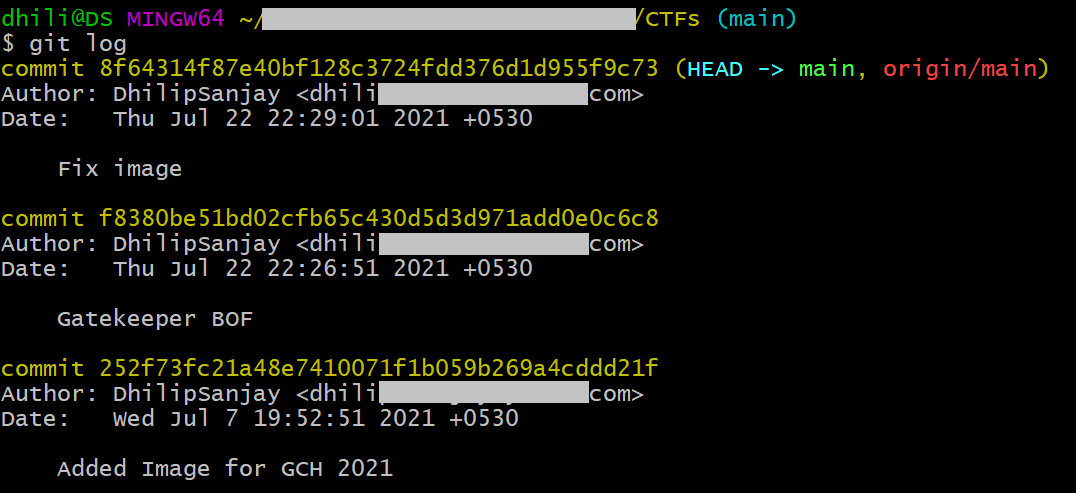
<p>Now that you have setup the Git CLI, you must have committed your code and pushed it to a public repository, all the <strong>git commits</strong> will have the following information:</p>

<div class="language-plaintext highlighter-rouge"><div class="highlight"><pre class="highlight"><code>    - Commit Hash
    - Author name &lt;Email Address&gt;
    - Date and time
    - Commit Message
</code></pre></div></div>

<p><img src="/assets/post-images/2021-07-25-protect-your-private-addresses/git-commits.png" alt="Git Commits" /></p>

<p>Even though the Web interface of Github doesn’t show the private email address, one can clone the public repository and run <strong>git log</strong> to view the commit history and there your private email addresses are leaked!</p>

<ul>
  <li>To get all the emails from <strong>git log</strong>, you can use this one-liner (in Linux):</li>
</ul>

<div class="language-bash highlighter-rouge"><div class="highlight"><pre class="highlight"><code><span class="c"># STEPS:</span>
  <span class="c"># 1. Clone the github repository</span>
  <span class="c"># 2. cd into the cloned repository</span>
  <span class="c"># 3. Run the one-liner:</span>
git log | <span class="nb">grep </span>Author | <span class="nb">cut</span> <span class="nt">-d</span> <span class="s2">":"</span> <span class="nt">-f2</span> | <span class="nb">sort</span> <span class="nt">-u</span> | <span class="nb">awk</span> <span class="s1">'{print $NF}'</span> | <span class="nb">sed</span> <span class="nt">-r</span> <span class="s1">'s/&lt;// ; s/&gt;//'</span>
</code></pre></div></div>

<hr />

<h2 id="how-to-protect">How to Protect?</h2>

<p>To protect the private email addresses from leaking in your commits, you must configure <strong>Github settings</strong> as well as <strong>Git CLI</strong>.</p>

<blockquote class="quote">
<p class="quote-text">The past cannot be changed, edited or erased; it can only be accepted!</p>
<p class="quote-text quote-credit">Random Git User😜</p>
</blockquote>

<h3 id="1-github-settings">1. Github Settings</h3>

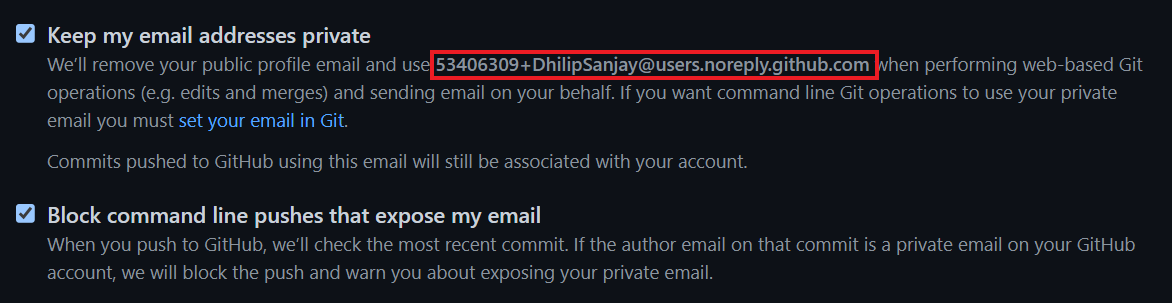
<p>Github provides two options to protect your private email addresses from leaking. Go to <a href="https://github.com/settings/emails">Your Profile -&gt; Emails</a> and enable these options:</p>

<p><img src="/assets/post-images/2021-07-25-protect-your-private-addresses/github-settings.png" alt="Github Settings" /></p>

<h3 id="2-changes-in-git-cli">2. Changes in Git CLI</h3>

<p>By enabling the second option in Github settings, any further commit which contains your <em>private email address will be blocked</em>! Now you have to configure the Git CLI to not include your private email address.</p>
<ul>
  <li>You can use any random email id like <strong>email@example.com</strong>. But the problem is that, your commits won’t be attributed to you!</li>
  <li>Alternatively, Github provides a <strong>dummy email id</strong> (highlighted in the previous image), which ensures that commits are attributed to you and appear in your contributions graph.</li>
</ul>

<div class="note set-aside blue">
  <p>Any commits you made prior to changing your commit email address are still associated with your previous email address. You must delete your whole commit history to get rid of that email address.</p>
</div>

<p>Change the email address using the git command:</p>

<div class="language-bash highlighter-rouge"><div class="highlight"><pre class="highlight"><code>git config <span class="nt">--global</span> user.email &lt;dummy-github-email&gt;
</code></pre></div></div>

<hr />

<h2 id="references">References</h2>

<ul>
  <li><a href="https://docs.github.com/en/github/setting-up-and-managing-your-github-user-account/managing-email-preferences">Github Docs - Managing email preferences</a></li>
  <li><a href="https://github.com/cirosantilli/all-github-commit-emails">5.8 Million Unique Commit Emails Extracted</a></li>
  <li><a href="https://stackoverflow.com/questions/897586/does-git-publicly-expose-my-e-mail-address">Stackoverflow - Does Git publicly expose my email address?</a></li>
</ul>]]></content><author><name></name></author><category term="privacy" /><category term="email" /><category term="osint" /><category term="git" /><category term="github" /><category term="bitbucket" /><summary type="html"><![CDATA[If you are using git and any code hosting platform like Github, Bitbucket, etc. to upload/commit your code, then you might be leaking your private email addresses. This article focuses on how exactly the private email addresses are being leaked and what you can do to protect them!]]></summary></entry></feed>